TR
TR EN
EN

What Is a Head-Up Display (HUD)? What Are Its Failures and Causes?
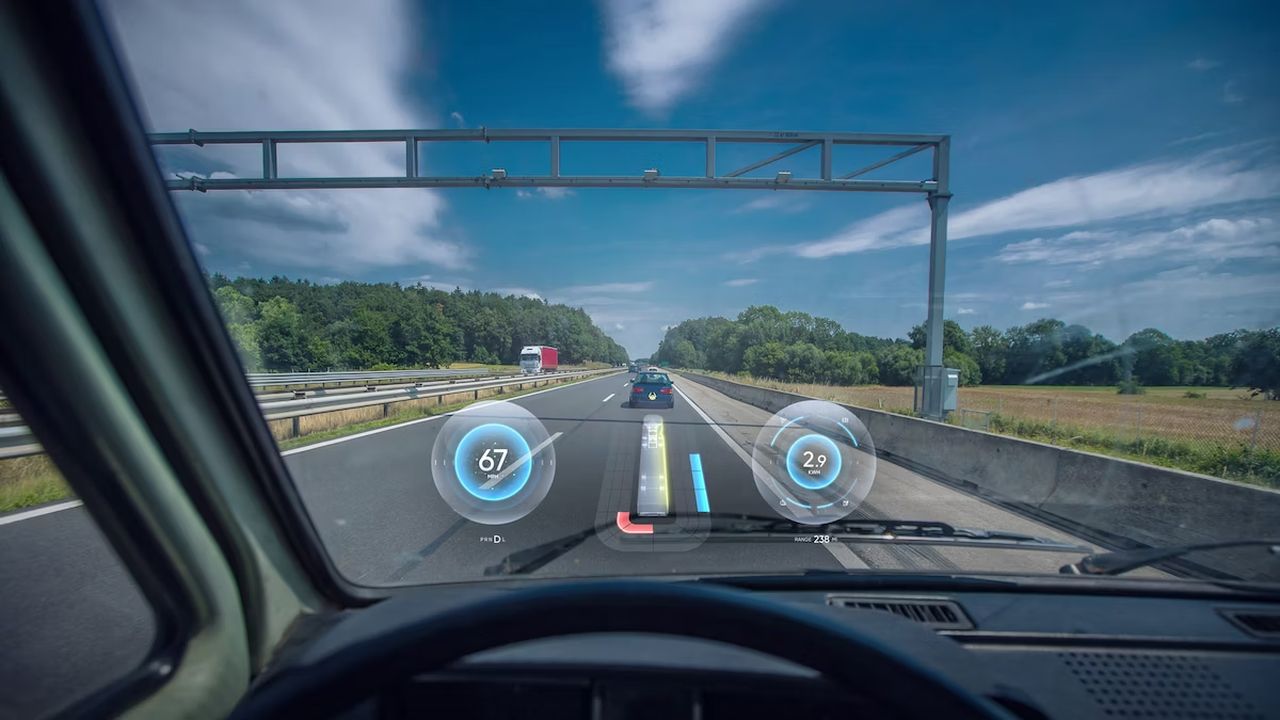
A Head-Up Display (HUD) is an electronic driver-information system that projects important vehicle information into the driver's field of view.
Instead of requiring the driver to look down at the instrument cluster, a HUD can display selected information in front of the driver, usually on the windshield or on a dedicated transparent combiner screen.
Depending on the vehicle, the displayed information may include:
-
Vehicle speed
-
Navigation directions
-
Turn-by-turn instructions
-
Traffic sign information
-
Driver assistance warnings
-
Lane departure warnings
-
Collision warnings
-
Cruise control information
-
Speed limit information
-
Engine or vehicle status information
The exact information depends on the vehicle manufacturer, HUD technology, software, and equipment level.
The main purpose of a HUD is to allow the driver to obtain important information while spending less time looking away from the road.
How Does a Head-Up Display Work?
A HUD uses a combination of an image-generating unit, optical components, and a reflective surface to place information within the driver's line of sight.
In many vehicles, a dedicated HUD projection unit is installed inside the dashboard.
The unit generates an image and directs light through an optical system toward the windshield or a transparent combiner.
The driver then sees the information as if it were floating in front of the vehicle.
A simplified process is:
Vehicle data → HUD control electronics → Image generation → Optical system → Windshield/combiner → Driver
The actual architecture can be considerably more complicated.
What Does the HUD Display?
The information displayed by a HUD varies according to the vehicle.
A basic HUD may show only:
-
Current speed
-
Navigation information
-
Cruise control settings
More advanced systems can display:
-
Speed limits
-
Traffic signs
-
Navigation arrows
-
Lane information
-
Following-distance warnings
-
Forward collision warnings
-
Blind spot warnings
-
Adaptive cruise control status
-
Lane keeping information
-
Incoming call information
-
Media information
The vehicle's central electronic systems provide the data used by the HUD.
What Is the Difference Between a HUD and the Instrument Cluster?
The instrument cluster is located directly in front of the driver and contains gauges and vehicle information.
A HUD presents selected information higher in the driver's field of view.
The two systems can display some of the same information, but they serve different purposes.
For example, the vehicle speed may be shown both on the instrument cluster and on the HUD.
The advantage of the HUD is that the driver does not need to lower their gaze toward the dashboard to see the information.
What Types of Head-Up Displays Are There?
HUD systems can generally be divided into several categories.
Windshield-projection HUD
This type projects information directly onto the windshield.
The windshield is specially designed to produce the required optical reflection.
Combiner HUD
A transparent panel, known as a combiner, is positioned in front of the driver.
The image is projected onto this panel instead of directly onto the windshield.
Aftermarket HUD
Some vehicles can be equipped with external or aftermarket HUD devices.
These systems may use a small transparent screen or project information onto the windshield.
However, their capabilities and image quality can differ significantly from factory-installed systems.
What Is the HUD Projection Unit?
The projection unit is one of the most important components of the system.
It creates the image that the driver sees.
Depending on the design, it may contain:
-
Light source
-
Display element
-
Mirrors
-
Lenses
-
Electronic circuits
-
Cooling components
-
Control electronics
If the projection unit fails, the HUD may become completely blank or display an abnormal image.
What Is the HUD Control Module?
The HUD control module manages communication between the display system and the vehicle's other electronic systems.
It may receive information from:
-
Instrument cluster
-
Body control module
-
Navigation system
-
ADAS systems
-
Engine control system
-
Transmission control system
-
Vehicle network
Depending on the vehicle architecture, the HUD may communicate over CAN or another vehicle communication network.
A communication problem can therefore prevent the HUD from receiving the information it needs.
What Are the Symptoms of Head-Up Display Failure?
A faulty HUD can produce different symptoms depending on the affected component.
Common symptoms include:
-
HUD does not turn on
-
HUD image disappears
-
Dim or weak display
-
Flickering image
-
Distorted image
-
Double image
-
Incorrect image position
-
Image appears too high or too low
-
Navigation information does not appear
-
Speed information is missing
-
Warning information does not appear
-
HUD settings cannot be changed
-
HUD repeatedly turns off
-
Error message appears
-
Display works intermittently
Some faults are electrical, while others are related to the optical system, windshield, software, or vehicle communication network.
HUD Does Not Turn On
A completely blank HUD is one of the easiest symptoms to notice.
The problem may be caused by:
-
Blown fuse
-
Power supply problem
-
Poor ground
-
Faulty HUD module
-
Wiring problem
-
Communication failure
-
Internal electronic failure
-
Software problem
Before replacing the HUD unit, its power supply and communication should be checked.
HUD Turns On but Nothing Is Visible
Sometimes the HUD is technically operating but the projected image cannot be seen.
Possible causes include:
-
Very low display brightness
-
Incorrect HUD settings
-
Bright sunlight
-
Optical unit problem
-
Projection unit failure
-
Windshield problem
-
Incorrect viewing position
Some HUD systems automatically adjust brightness according to ambient light.
If the brightness sensor or related control system malfunctions, the image may become too dim or too bright.
HUD Image Is Too Dim
A dim HUD does not necessarily mean that the projection unit has failed.
Possible causes include:
-
Bright ambient light
-
Incorrect brightness setting
-
Faulty ambient-light sensor
-
Aging light source
-
Optical contamination
-
Projection-unit fault
-
Electrical supply problem
The first step should be to verify the HUD brightness setting and operating conditions.
HUD Image Flickers
A flickering HUD can indicate an electrical or electronic problem.
Possible causes include:
-
Unstable power supply
-
Loose connector
-
Wiring problem
-
Internal electronic fault
-
Overheating
-
Communication interruption
-
Projection unit failure
If the flickering occurs only after the vehicle becomes hot, temperature-related electronic failure should also be considered.
HUD Image Is Distorted
A distorted image may indicate an optical problem.
Possible causes include:
-
Damaged optical components
-
Projection-unit failure
-
Incorrect windshield
-
Incorrect windshield installation
-
Optical alignment problem
-
Physical damage to the HUD unit
A windshield replacement can be particularly important when diagnosing a factory HUD.
Why Can Windshield Replacement Affect a HUD?
This is an important issue with factory-installed HUD systems.
A conventional windshield and a HUD-compatible windshield are not necessarily optically identical.
A HUD windshield may have a special optical construction designed to reflect the projected image correctly toward the driver.
If an unsuitable windshield is installed, the driver may experience:
-
Double images
-
Ghosting
-
Reduced brightness
-
Distorted information
-
Poor image positioning
Therefore, the correct windshield specification should be used on vehicles equipped with a windshield-projection HUD.
HUD Displays a Double Image
A double or ghost image can be particularly noticeable on HUD-equipped vehicles.
One possible cause is the windshield itself.
The windshield has multiple layers, and the projected light can produce reflections from different surfaces.
If the windshield is not designed for the vehicle's HUD system, these reflections may become more visible.
Incorrect windshield installation or optical alignment can also contribute.
HUD Image Is in the Wrong Position
A HUD system normally allows the driver to adjust the image position.
Depending on the vehicle, the driver may be able to change:
-
Vertical position
-
Brightness
-
Rotation
-
Display content
If the image suddenly appears significantly higher, lower, or otherwise incorrectly positioned, possible causes include a setting change, calibration problem, mechanical displacement, or projection-unit fault.
HUD Does Not Display Vehicle Speed
If the HUD turns on but vehicle speed is missing, the projection system itself may not necessarily be faulty.
The HUD needs vehicle-speed information from another electronic system.
A communication problem between the HUD and instrument cluster or another control module could prevent the speed information from being displayed.
This is why diagnostic communication should be checked before replacing the projection unit.
Navigation Information Does Not Appear on the HUD
Navigation information may depend on communication between the HUD and the infotainment or navigation system.
Possible causes include:
-
Navigation system problem
-
Communication fault
-
Software problem
-
Incorrect settings
-
HUD configuration issue
-
Infotainment system fault
If speed and other information work normally but navigation does not, the problem may be outside the HUD itself.
HUD Warning Information Does Not Appear
Modern vehicles can integrate HUD operation with advanced driver-assistance systems.
For example, a vehicle may display warnings related to:
-
Forward collision
-
Lane departure
-
Speed limits
-
Navigation
-
Adaptive cruise control
If these warnings disappear from the HUD while other information remains available, the problem may involve the source system or communication network rather than the display hardware.
Can a Weak Battery Cause HUD Problems?
Yes.
The HUD is an electronic system and depends on stable vehicle voltage.
A weak battery or charging-system problem can sometimes cause electronic modules to behave abnormally.
Possible symptoms may include:
-
HUD not starting
-
Intermittent operation
-
Communication faults
-
Multiple warning messages
-
Temporary loss of display functions
If several electronic systems begin malfunctioning at the same time, battery voltage and charging-system condition should be checked.
Can a Blown Fuse Cause HUD Failure?
Yes.
The HUD system normally receives electrical power through one or more fuses.
If the relevant fuse fails, the system may become completely inactive.
However, replacing the fuse without investigating why it failed is not always sufficient.
If the replacement fuse blows again, there may be a short circuit or another electrical problem.
Can Wiring Problems Cause HUD Failure?
Yes.
The HUD depends on electrical power and communication connections.
Possible wiring problems include:
-
Open circuit
-
Short circuit
-
High resistance
-
Poor ground
-
Loose connector
-
Corroded terminal
-
Damaged wiring harness
A wiring problem can make a perfectly functional HUD module appear to be defective.
Can CAN Bus Problems Affect the HUD?
Yes.
Many modern HUD systems communicate with other vehicle control modules through the vehicle's communication network.
If communication is interrupted, the HUD may not receive the information required for normal operation.
Possible causes include:
-
CAN wiring problem
-
Communication module failure
-
Low battery voltage
-
Connector problem
-
Another module disrupting network communication
-
Software-related issue
A communication fault should be diagnosed at the network level rather than automatically blaming the HUD.
Can Software Cause HUD Problems?
Yes.
Modern HUD systems are controlled by software.
A software problem may cause:
-
Missing information
-
Incorrect display behavior
-
Intermittent operation
-
Communication errors
-
Incorrect settings
-
System freezing
Depending on the vehicle, a software update or module reprogramming may be required.
Does a HUD Need Calibration?
Some HUD systems may require calibration or configuration after certain repairs.
The exact procedure depends on the vehicle.
Calibration or configuration may be necessary after:
-
HUD replacement
-
Windshield replacement
-
Instrument cluster replacement
-
Certain dashboard repairs
-
Module replacement
-
Software updates
The manufacturer determines the required procedure.
How Is a HUD Problem Diagnosed?
Diagnosis should begin with the simplest possible checks.
First, verify whether the HUD is enabled and whether its brightness and position settings are correct.
Next, the vehicle's electrical system should be checked.
The technician may inspect:
-
Fuses
-
Power supply
-
Ground connections
-
Wiring
-
Connectors
-
Communication lines
A diagnostic scan can then determine whether the HUD or related modules have stored fault codes.
If the HUD communicates with the diagnostic tool, live data and communication status may provide additional information.
What Diagnostic Trouble Codes Can a HUD Store?
The exact codes depend on the vehicle manufacturer.
Possible fault categories include:
-
HUD module internal fault
-
Communication fault
-
Power supply fault
-
Display fault
-
Configuration fault
-
Calibration fault
-
Software fault
-
Instrument cluster communication fault
Some vehicles may store manufacturer-specific diagnostic codes rather than generic OBD-II codes.
Therefore, a diagnostic tool capable of accessing body and ADAS-related modules may be required.
Can a HUD Be Repaired?
Sometimes.
The answer depends on the type of failure.
A wiring or connector problem may be repairable.
A software problem may be resolved through programming or updating.
An internal projection-unit failure may require professional electronic repair or replacement.
Because HUD systems contain precision optical components, repair is not always as simple as replacing an electronic circuit.
Should a Failed HUD Be Replaced Completely?
Not necessarily.
The correct repair depends on the failed component.
For example, if the problem is caused by:
-
Fuse → fuse replacement after finding the cause
-
Wiring → wiring repair
-
Connector → connector repair
-
Software → update or programming
-
Calibration → calibration
-
Projection unit → repair or replacement
-
Control module → repair or replacement
Replacing the entire system without diagnosis can be unnecessarily expensive.
Can a HUD Be Added to a Car That Does Not Have One?
In some vehicles, aftermarket HUD systems can be installed.
However, a factory-integrated HUD is much more complex than a simple aftermarket display.
A factory system may require integration with:
-
Instrument cluster
-
Navigation
-
ADAS
-
Vehicle network
-
Steering controls
-
Body electronics
For this reason, retrofitting a factory HUD can be significantly more complicated than installing a standalone aftermarket device.
Is a HUD Safe to Use?
A properly designed and correctly adjusted HUD can help the driver access information without looking down toward the instrument cluster.
However, it should not be used as a reason to ignore the road.
The driver should remain focused on traffic and surroundings.
Information displayed by the HUD is supplementary and does not replace attentive driving.
Does Every HUD Project Information Directly Onto the Windshield?
No.
Some systems use a dedicated transparent combiner instead.
A combiner is a transparent optical surface positioned in front of the driver.
It reflects the projected image toward the driver while allowing the road to remain visible through it.
The choice between windshield projection and a combiner depends on the vehicle design.
Final Thoughts
A Head-Up Display (HUD) is an advanced vehicle information system designed to present important information within the driver's field of view.
Depending on the vehicle, it can display speed, navigation instructions, traffic signs, cruise-control information, lane information, and various driver-assistance warnings.
The system relies on several components, including a projection unit, optical elements, control electronics, vehicle communication networks, and, in windshield-projection systems, a suitable windshield.
HUD failures can appear in many different forms.
The display may be completely blank, too dim, flickering, distorted, incorrectly positioned, or missing specific information such as speed or navigation directions.
The cause may be a failed projection unit, damaged wiring, poor electrical supply, low battery voltage, communication failure, software problem, incorrect calibration, or an unsuitable windshield.
Windshield replacement deserves particular attention on HUD-equipped vehicles because the optical characteristics of the windshield can directly affect image quality.
A double image, ghosting, or distorted projection after windshield replacement does not necessarily mean that the HUD itself has failed.
The most reliable approach is to diagnose the system systematically rather than immediately replacing the expensive HUD module.
Checking the power supply, fuses, grounds, wiring, connectors, communication network, diagnostic trouble codes, software configuration, and windshield specification can help identify the real cause.
When properly functioning and correctly adjusted, a HUD can make important vehicle information easier to see while helping the driver keep their attention closer to the road ahead.