TR
TR EN
EN

Why Is My Backup Camera Not Working? Common Causes, Diagnosis, and Repair Solutions
Backup cameras have become a standard safety feature in many modern vehicles, helping drivers reverse and park more safely by providing a clear view of the area behind the vehicle. These systems reduce blind spots, improve parking accuracy, and help prevent collisions with pedestrians, obstacles, or other vehicles.
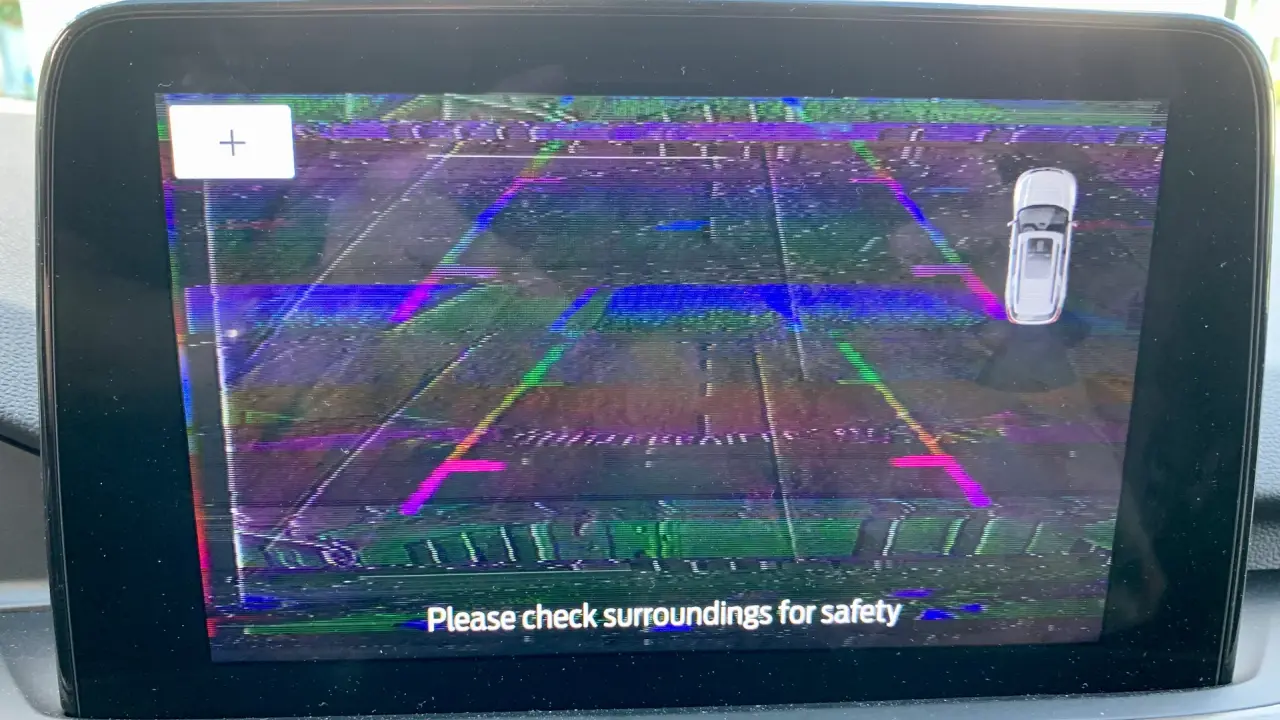
Although backup camera systems are generally reliable, they can occasionally stop working due to electrical faults, damaged wiring, software issues, or camera hardware failures. The display may show a black screen, a distorted image, intermittent video, or a "Camera Unavailable" message.
Understanding the most common causes can help you diagnose the problem and determine whether a simple repair or professional service is required.
How Does a Backup Camera System Work?
A backup camera system consists of several components working together.
Camera Module
The camera is usually mounted near the rear license plate, tailgate handle, or trunk lid. It captures live video whenever reverse gear is selected.
Control Module
Many vehicles use a dedicated camera control module or body control module (BCM) to process the video signal before sending it to the infotainment display.
Infotainment Display
The processed video appears on the vehicle's infotainment screen or rearview mirror display, often with parking guidelines that assist the driver while reversing.
Electrical System
The camera receives power through the vehicle's electrical system, usually when reverse gear is engaged. Wiring harnesses, connectors, fuses, and grounding points all play important roles in reliable operation.
Electrical Power Problems
One of the most common reasons a backup camera stops working is a loss of electrical power.
Blown Fuse
A blown fuse can completely disable the backup camera system. Checking the vehicle's fuse box is often the first diagnostic step.
If the replacement fuse blows again immediately, there may be an electrical short that requires further inspection.
Low Battery Voltage
A weak battery or charging system problem can affect electronic components throughout the vehicle.
If battery voltage drops below normal operating levels, the backup camera may fail to initialize or may display intermittent operation.
Damaged Power Wiring
Over time, wiring may become worn, pinched, broken, or disconnected, particularly around the tailgate or trunk where cables repeatedly flex during opening and closing.
Ground Connection Problems
Like any electronic system, the backup camera requires a solid ground connection.
Poor grounding can cause:
-
Black screen.
-
Flickering image.
-
Intermittent operation.
-
Complete camera failure.
Grounding issues are commonly caused by:
-
Loose ground bolts.
-
Corrosion.
-
Damaged ground wires.
-
Previous aftermarket electrical modifications.
Cleaning and securing the ground connection often restores normal operation.
Physical Damage to the Camera
The camera itself may become damaged over time.
Dirty or Obstructed Lens
Mud, road salt, dust, snow, rain, or water droplets can block the camera lens, reducing image quality or making the display appear blurry.
Cleaning the lens with a soft microfiber cloth is often enough to restore a clear image.
Cracked Camera Lens
Minor collisions, parking impacts, or flying road debris can crack the protective lens.
A cracked lens allows moisture to enter the camera housing, often causing permanent internal damage.
Water Intrusion
Although backup cameras are weather-resistant, damaged seals can allow moisture inside the housing.
Signs of water damage include:
-
Foggy image.
-
Flickering display.
-
Complete image loss.
-
Internal condensation behind the lens.
In most cases, a water-damaged camera must be replaced.
Internal Camera Failure
Inside the camera housing are sensitive electronic components that can eventually fail.
Image Sensor Failure
Most backup cameras use CMOS image sensors.
If the sensor fails, the display may remain black even though the camera continues receiving power.
Circuit Board Damage
Long-term vibration, heat, moisture, or manufacturing defects may damage internal electronic circuits.
In some cases, failed solder joints can interrupt the video signal.
Professional testing is usually required to confirm internal camera failure.
Wiring and Video Signal Problems
The video signal travels from the camera to the display through dedicated wiring.
If this connection is interrupted, no image will appear.
Damaged Video Cable
Video cables may become pinched, stretched, or cut, especially where wiring passes through the trunk lid or tailgate.
Common symptoms include:
-
Intermittent video.
-
Static.
-
Screen flickering.
-
No picture at all.
Loose Connectors
Loose or corroded connectors can interrupt both power and video transmission.
Disconnecting, cleaning, and securely reconnecting the electrical connectors often resolves intermittent problems.
Infotainment System or Display Problems
Sometimes the camera is functioning normally, but the display system is not.
Possible causes include:
-
Software glitches.
-
Frozen infotainment system.
-
Failed display hardware.
-
Communication errors between control modules.
Restarting the infotainment system or installing manufacturer software updates may restore normal operation.
In some vehicles, disconnecting the battery for several minutes may reset the system, although manufacturer procedures should always be followed.
Common Symptoms of a Faulty Backup Camera
A failing backup camera may exhibit one or more of the following symptoms:
-
Black screen when reverse gear is selected.
-
Blue screen or "No Signal" message.
-
Blurry or distorted image.
-
Flickering display.
-
Camera works only occasionally.
-
Delayed camera activation.
-
Frozen image.
-
Parking guidelines appear without a camera image.
-
"Camera Unavailable" warning message.
These symptoms can help narrow down whether the problem lies with the camera, wiring, or display system.
How to Diagnose Backup Camera Problems
A systematic inspection usually identifies the source of the problem.
Visual Inspection
Begin by checking:
-
Camera lens condition.
-
Camera housing.
-
Wiring harness.
-
Connectors.
-
Tailgate wiring.
-
Signs of moisture or corrosion.
Physical damage is often easy to identify.
Electrical Testing
Using a digital multimeter, verify:
-
Battery voltage at the camera connector.
-
Ground continuity.
-
Fuse condition.
-
Wiring continuity.
If proper voltage reaches the camera but no image is produced, the camera itself may be defective.
Diagnostic Scan
Many modern vehicles store diagnostic trouble codes related to camera systems.
A professional scan tool capable of communicating with body control modules can identify faults involving:
-
Camera circuits.
-
Communication networks.
-
Display modules.
-
Reverse gear signals.
-
Infotainment system errors.
These codes can significantly reduce troubleshooting time.
Software Verification
Manufacturers occasionally release software updates that improve camera performance or correct known software bugs.
Checking for available updates should be part of the diagnostic process.
Repair Solutions
The correct repair depends on the underlying cause.
Repair Damaged Wiring
Broken or corroded wires should be repaired using manufacturer-approved methods.
Any damaged connectors should also be replaced if necessary.
Replace Blown Fuses
Always install a replacement fuse with the correct amperage rating.
Never install a higher-rated fuse, as this may damage the electrical system.
Replace the Camera Module
If the camera has internal damage, water intrusion, or a failed image sensor, replacing the camera is usually the only permanent solution.
Using an OEM or high-quality replacement camera helps ensure proper image quality and compatibility.
Update or Reset the Infotainment System
Software-related issues may be resolved by:
-
Installing manufacturer software updates.
-
Resetting the infotainment system.
-
Reprogramming the control module when required.
Some vehicles require dealer-level diagnostic equipment for software updates.
Does a New Backup Camera Need Calibration?
Many newer vehicles equipped with advanced driver assistance systems (ADAS) require camera calibration after replacement.
Calibration ensures that parking guidelines and safety features such as rear cross-traffic alert or parking assist operate accurately.
Failure to perform calibration may affect system performance and overall safety.
Final Testing
After completing repairs, the system should be thoroughly tested.
The technician should verify that:
-
The camera activates immediately when reverse gear is selected.
-
The image is sharp and stable.
-
Parking guidelines display correctly.
-
No warning messages appear.
-
All diagnostic trouble codes have been cleared.
-
The system operates consistently during multiple reverse cycles.
A backup camera that stops working is usually caused by electrical problems, damaged wiring, faulty grounding, camera hardware failure, software issues, or infotainment system faults. While something as simple as a dirty lens or blown fuse can sometimes be the cause, more complex issues may require professional diagnostic equipment.
A careful inspection of the camera, electrical connections, wiring, fuses, and control modules is the most effective way to identify the source of the problem. Replacing damaged components, repairing wiring, updating software, and performing any required camera calibration will restore proper operation and help maintain the safety features that modern drivers rely on every day.