TR
TR EN
EN

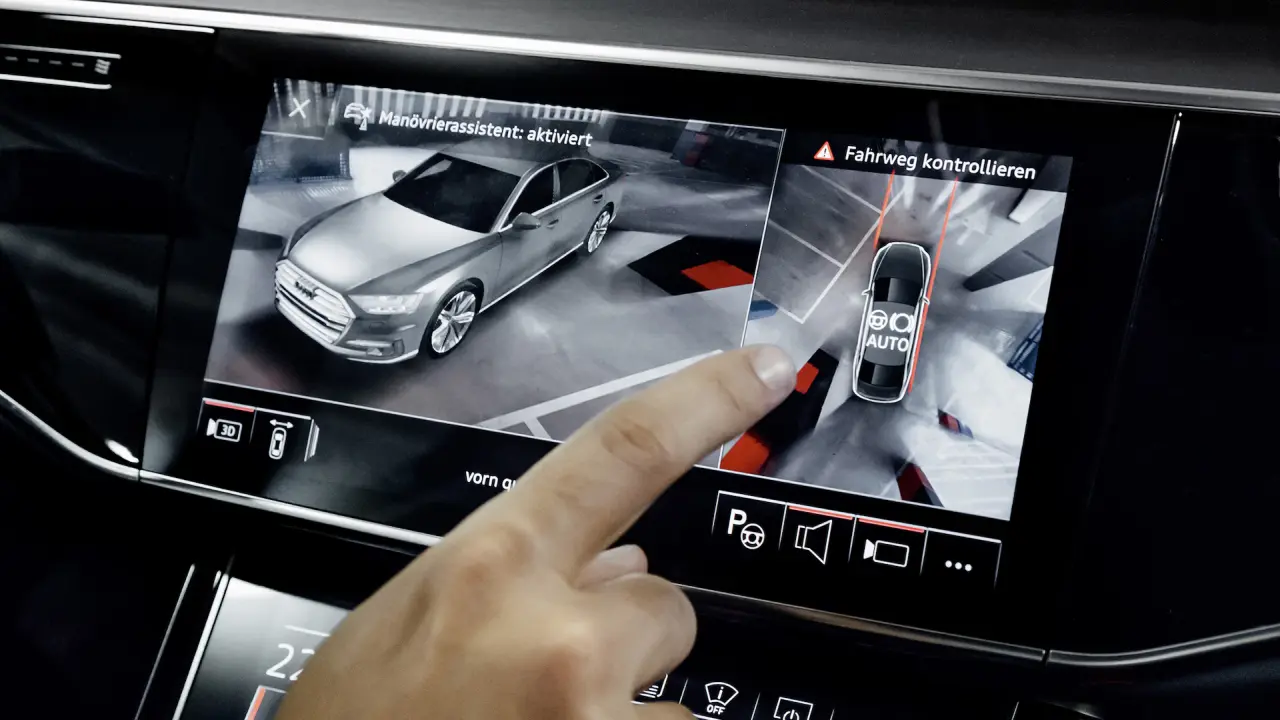
What Is a Surround View Camera? How Does It Work?
A surround view camera system is an advanced driver-assistance technology designed to give the driver a bird's-eye or 360-degree view around the vehicle. By combining images from multiple cameras mounted around the vehicle, the system creates a single composite image that shows the area surrounding the car.
This technology is particularly useful when parking, maneuvering in narrow spaces, reversing, or driving in areas where objects close to the vehicle may be difficult to see from the driver's seat. It has become increasingly common in modern vehicles, especially in higher-trim passenger cars and vehicles equipped with advanced parking assistance systems.
What Is a Surround View Camera?
A surround view camera, also known as a 360-degree camera, 360° surround camera, or bird's-eye view camera, is a camera-based system that provides a comprehensive view around the vehicle.
Unlike a conventional rear-view camera, which mainly shows the area behind the vehicle, a surround view system uses several cameras positioned at different locations.
A typical system may include:
-
A front-facing camera
-
A rear-facing camera
-
A camera under or near each side mirror
-
A central control unit that processes the camera images
-
A multimedia display or instrument screen
-
Software that combines and corrects the individual images
The cameras capture different sections around the vehicle, and specialized software combines these images to create a virtual overhead view.
How Does a 360-Degree Camera Work?
The basic principle is relatively simple, but the image-processing technology behind it is sophisticated.
When the driver activates the surround view system, several cameras operate simultaneously. Each camera captures a different part of the area surrounding the vehicle.
The system then processes these images and combines them into a single representation.
The process generally works in several stages:
1. Multiple cameras capture the surroundings
The cameras continuously or selectively capture images around the vehicle. Wide-angle lenses are typically used because each camera needs to cover a large area.
2. The camera images are processed
Because the cameras use wide-angle lenses, their images contain distortion. The control unit corrects this distortion and adjusts the individual images so they can be combined.
3. The images are stitched together
Software matches overlapping areas between the camera images. The system then creates a single panoramic representation of the area surrounding the vehicle.
4. A virtual top-down image is generated
The processed images are projected onto a virtual representation of the vehicle and the surrounding ground. This creates the familiar bird's-eye view displayed on the infotainment screen.
The result gives the driver the impression of looking at the vehicle from above, even though there is no physical camera mounted directly over the vehicle.
Where Are the Cameras Located?
The exact configuration varies between manufacturers and vehicle models, but a typical surround view system uses four cameras.
One camera is generally positioned at the front of the vehicle, another at the rear, while the remaining cameras are mounted underneath or near the side mirrors.
Their positions are carefully selected so that the cameras' fields of view overlap.
This overlap is essential because the system needs common visual areas to accurately stitch the images together.
Why Does the Surround View Image Look Like the Camera Is Above the Car?
One of the most interesting aspects of the system is the virtual overhead perspective.
There is usually no camera physically located above the vehicle. Instead, the vehicle's cameras capture images from different angles. The software then transforms these images using geometric calculations and projects them onto a virtual surface.
The system can therefore create a view that resembles an image captured from above.
The vehicle shown in the center of the display is also normally a graphical representation. Depending on the system, the software can use a vehicle model or a representation based on the camera calibration.
What Is Camera Calibration?
Calibration is one of the most important parts of a surround view system.
The system needs to know the exact position and orientation of every camera. It also needs to understand the relationship between the cameras and the vehicle.
During calibration, the system establishes parameters that allow the images from different cameras to be correctly aligned.
If calibration is incorrect, the image may contain visible errors. For example, an object may appear displaced, distorted, or incorrectly positioned.
This is why replacing a camera, side mirror, bumper, or other component containing a camera may sometimes require recalibration.
What Is the Difference Between a Rear-View Camera and a Surround View Camera?
A conventional rear-view camera primarily shows the area behind the vehicle. It is especially useful when reversing.
A surround view system, on the other hand, provides a much wider perspective.
A rear camera may show:
-
The area directly behind the vehicle
-
Parking spaces
-
Obstacles behind the car
-
Pedestrians or objects in the rear area
A 360-degree system can additionally show:
-
The front of the vehicle
-
Both sides
-
Areas close to the front and rear corners
-
The surrounding parking area
-
The vehicle's position relative to lines and obstacles
The two systems therefore serve similar purposes but provide very different levels of visibility.
How Does It Help When Parking?
Parking is one of the most important applications of surround view technology.
When a driver parks in a narrow space, it can be difficult to see exactly how close the vehicle is to nearby cars, walls, pillars, curbs, or other obstacles.
The 360-degree view makes it easier to understand the vehicle's position.
For example, the driver can see whether the vehicle is:
-
Too close to a neighboring car
-
Approaching a curb
-
Centered within a parking space
-
Too close to a wall or pillar
-
Positioned correctly before reversing
Many systems also display parking guidelines on the screen. These lines may indicate the expected path of the vehicle based on the steering angle.
Can a Surround View Camera Detect Obstacles?
A camera system can visually display obstacles, but it is important to distinguish between camera visualization and object detection.
A basic surround view system primarily provides images. It does not necessarily identify every object automatically.
More advanced systems may use image-processing algorithms, ultrasonic parking sensors, radar, or other sensors to detect and classify objects.
For example, a vehicle may combine:
-
360-degree cameras
-
Ultrasonic parking sensors
-
Front and rear parking sensors
-
Radar
-
Automatic braking systems
When these technologies work together, the vehicle can provide more comprehensive parking assistance.
Does a 360-Degree Camera Work While Driving?
Although surround view systems are mainly associated with parking and low-speed maneuvering, some vehicles allow the cameras to be activated while driving at low speeds.
The exact operating conditions depend on the manufacturer and vehicle.
Some systems may automatically display the camera view when:
-
Reverse gear is selected
-
A parking sensor detects an obstacle
-
The vehicle is traveling at a low speed
-
The driver activates the camera manually
-
A parking assistance function is being used
At higher speeds, the system may automatically switch off or restrict certain camera views.
What Happens If One Camera Fails?
Because a surround view system depends on multiple cameras, a failure in one camera can affect the overall image.
Possible symptoms include:
-
One section of the 360-degree image being unavailable
-
A black or blank camera image
-
Distorted areas in the surround view
-
Warning messages on the dashboard or infotainment screen
-
Incorrect image stitching
-
The entire surround view function being disabled
A problem does not always mean that the camera itself has failed. Wiring, connectors, power supply, communication networks, software, calibration, or the camera control module can also cause problems.
Common Problems With Surround View Camera Systems
Several issues can affect the performance of a 360-degree camera system.
Dirty camera lenses
Mud, dust, rain, snow, or road salt can partially block the cameras and reduce image quality.
Damaged cameras
A minor collision or parking impact can damage a camera mounted in a bumper, mirror, or grille.
Broken wiring or connectors
Camera wiring may be damaged during body repairs, bumper removal, mirror replacement, or other maintenance work.
Incorrect calibration
A camera that has been moved or replaced may no longer be correctly aligned with the other cameras.
Software problems
Because modern surround view systems rely heavily on image processing, software errors can also affect the displayed image.
Poor weather conditions
Heavy rain, snow, fog, or dirt can reduce the quality of the camera images. A camera cannot provide a clear image if its lens is completely covered.
Does a 360-Degree Camera Replace the Driver's Visual Checks?
No.
A surround view camera is an assistance system, not a replacement for the driver's attention.
There can be areas that the cameras cannot see clearly, particularly when an object is very close to the vehicle or positioned outside the cameras' fields of view. The virtual overhead image can also create a false sense of precision because it is a computer-generated representation rather than a direct image from a single overhead camera.
The driver should therefore continue checking mirrors and surroundings directly, especially when children, pedestrians, animals, or other vulnerable road users may be nearby.
Advanced Surround View Systems
Modern systems are becoming much more sophisticated than simple 360-degree camera displays.
Depending on the vehicle, advanced systems can offer:
-
Automatic parking assistance
-
Dynamic parking guidelines
-
3D vehicle views
-
Transparent hood views
-
Trailer assistance
-
Curb detection
-
Obstacle visualization
-
Automatic camera activation
-
Integration with parking sensors
-
Integration with autonomous emergency braking
Some systems can even create specialized views that allow the driver to see areas that would normally be hidden behind parts of the vehicle.
The Future of Surround View Cameras
As vehicles become increasingly dependent on cameras and electronic driver-assistance systems, surround view technology is expected to become more advanced.
Higher-resolution cameras, better image processing, artificial intelligence, improved low-light performance, and more accurate object recognition will allow these systems to provide increasingly detailed information.
In the future, surround view cameras may become more closely integrated with automated parking and other low-speed autonomous driving functions.
Conclusion
The surround view camera is one of the most useful modern technologies for improving visibility around a vehicle. By combining images from several cameras and processing them into a single virtual overhead view, the system allows drivers to better understand the position of their vehicle and nearby obstacles.
Although the technology is particularly valuable during parking and low-speed maneuvering, its real strength comes from the combination of cameras, image processing, sensors, and vehicle control systems.
A 360-degree camera does not replace the driver's responsibility, but when used correctly, it can make parking easier, reduce blind spots, and provide a much clearer picture of the space immediately surrounding the vehicle.